
User Interface
The Workbench UI provides a window manager and a desktop shell with keyboard-accelerated tools. The main components are:
- Menubar - access to programs and configuration
- Stash - note-taking and system status
- Switcher - task and window switching
- Window management - shortcuts for arranging windows
Menubar⌘Esc

The menubar is divided into three regions:
The menubar can be accessed via the keyboard with⌘Esc.
Stash⌘⌘
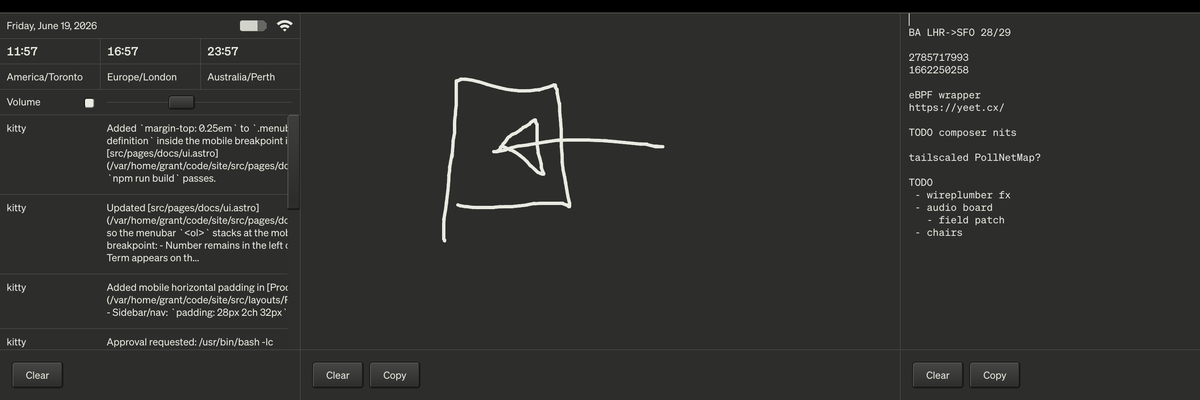
Stash provides rapid note-taking and access to basic system settings. Open and close Stash with both command keys:⌘⌘. Hold and release to “glance” at Stash (e.g. to check the clocks).
On the c100, Stash is opened with⌘⌘. On keyboards from other systems, Stash can be activated with the two modifier keys on either side of the space bar:
Stash can also be accessed with the mouse, via the System Menu.
Switcher⌘⇥
Switcher provides task-switching based on programs and windows.
Move between programs with⌘⇥.Move between related windows with⌘`.
Move between all open windows with⎇⇥.
Window Management⌘^
Workbench windows can float in any position or be tiled, where they are aligned to a grid.
The layout grid divides the display into eight positions: two rows by four columns. Window movement commands place the focused window into common regions of that grid, such as the left half, right half, a corner, the center, or the full display.
Move the focused window left with⌘^←.
Repeating a movement command cycles through useful variants. For example, the right movement starts at the right half of the display, then cycles to the right edge, then back again. Corner movements cycle between the larger corner region and the individual grid cells in that corner.
Floating windows use three standard sizes: small, medium, and large. When a window is reset to the home position, it returns to a centered floating position and repeated reset commands cycle through those standard sizes.
More shortcuts are listed in the keyboard documentation.